
Computational poetry showing stripes and text responding to ICE raids, code in L5 (animation has been shortened, excerpted, color reduced and compressed)
I’m not sure if I’ll do a post every month on L5, the creative coding library I initiated summer/fall 2025 and that is now out in an alpha version, but there’s enough activity happening that it seems like a good idea to capture work and ideas down somewhere to track progress.
Since I last wrote about the first L5 contributors meeting we’ve now held a second meeting, though this one was rolled into the first Permacomputing NYC meetup, with one part of it being about L5. We had 20 people show up, discussed permacomputing, which was a spirited conversation, and then had a presentation on Lichen-Markdown by Max Fowler, followed by my own presentation on L5. Also I want to note that L5 now has a page on the Permacomputing Wiki.
Since last month’s meetup, L5 now has:
- Step by step install guides for Mac, Windows and Linux
- a new printToScreen() function
- updated Getting Started instructions for your first steps after installing L5 and Love2d
- new Contributing to L5 guide (thanks to Jessica Garson for contributing this!)
- updated L5 Starter project that is more beginner-friendly (thanks to the entire group that contributed ideas to this at the last contributors meetup)
- there were also a few contributed pull requests to the L5 website that fixed typos, added links, corrected code examples
This is so exciting, that L5 is starting to grow a community around it!
In the coming month or two there are a few events where I’ll be presenting L5. There is going to be an L5 workshop at the next CCFest 2026 on March 21, a talk I’ll give on L5 for the next Wordhack at Brooklyn’s own Wonderville on February 19, and an in-person workshop with L5 at the Algorithmic Art Assembly at Grey Area in San Francisco on March 26.
New feature: printToScreen()
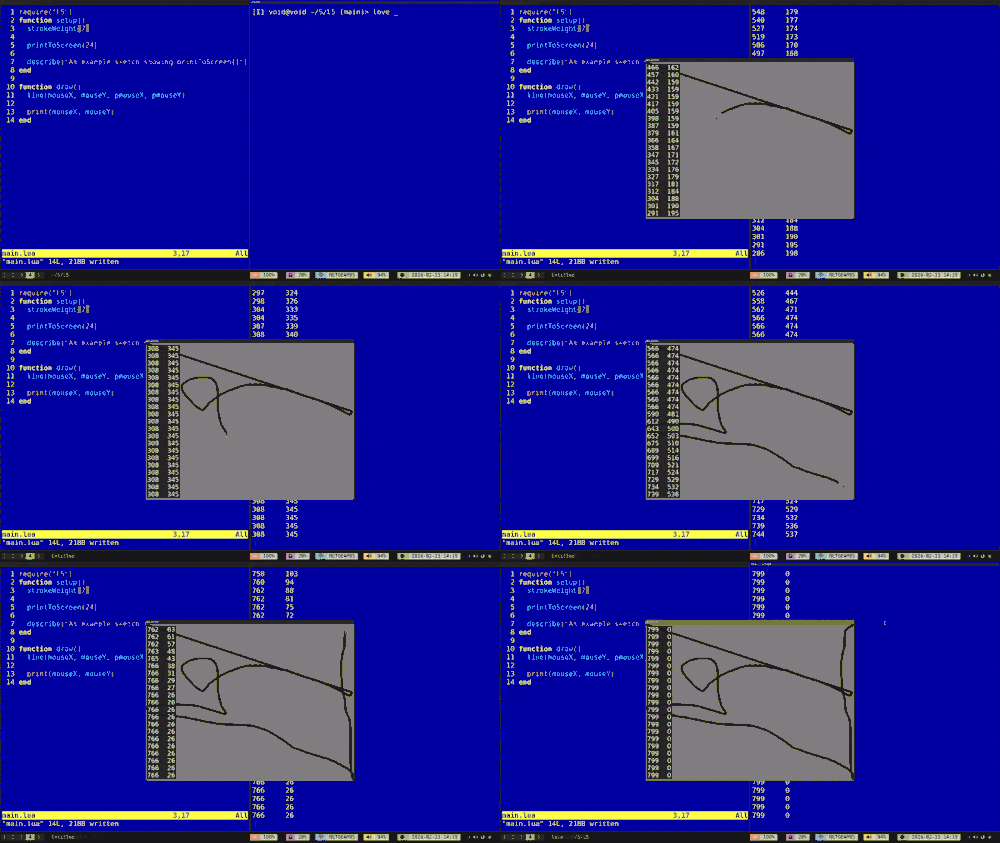
L5 code in the Neovim editor on left and the running code sketch in the center showing drawing lines based on mouse position and an onscreen print output that scrolls. Animation is an excerpt of running program, with compressed colors and reduced graphical fidelity/detail
As mentioned, L5 now ships with a new function printToScreen(). Simply add that function to your code somewhere, like in setup(), and then print() output will display onscreen. This allows someone programming in L5 to simply drag-and-drop their program folder onto the Love icon to run it and to see debugging output.
This is a divergence in some ways from Processing and p5.js. Processing is run from the Processing Development Environment (PDE). It has a console for printing debugging output with print() and error messages, on the bottom of the IDE. p5.js can be run directly in a browser through a local server, or hosted online, but the majority of people (I believe) and most beginners are running it through the online web editor. This likewise includes a console that displays error messages and the output of print statements.
L5 is implemented in the Love2d framework and Lua language. To run a program written in L5, one needs to install Love2d, and use a code editor/IDE of one’s own choice. For beginners, to see debugging output of the print() function was a higher barrier because it required running one’s program from the command line just to see your output.
At the first L5 contributors meetup I had watched experienced programmers who don’t use the command line struggle to use it. I had hoped that it would be possible to implement a new L5 mode in the Processing PDE for specifically these programmers, but there is still debugging happening in modes, and there will be a series of work to be done to complete this. What’s more, not everyone will want to use it. Maybe they are more used to SublimeText or VS Code or other IDEs for example. Through conversation with Jessica Garson, who wrote the updated Contributors guide, I showed off how Pico-8 includes all print debugger output onscreen and that we could take that approach with L5. The result is that a programmer that does not use the command line could simply drag-and-drop their L5 sketch folder onto Love to launch it, and see the output of their print() debugging in their sketch window. It took me a couple days of implementing, testing and refining, but the end result is exactly this.
To support print() in the draw(), there is a buffer on the backend that ‘scrolls’ the print output and displays as many lines of print as will fit onscreen. You can also optionally specify a default onscreen font size for the print output. And all this just from adding printToScreen() somewhere in your sketch, typically in the setup().
What’s next
There are still bugs in L5, opportunities for optimizations, fixes and additions to be implemented for drawing custom shapes and bezier curves, as well as need for more tutorials and examples. L5 is part of a proposal by Processing for Google Summer of Code - if accepted it may be possible to have a paid fellow work on L5 this summer. There are also two usability studies being conducted on L5 this spring by University of Washington’s Human Centered Design and Engineering.
Other areas of opportunity that could use some work and help, if contributors are interested, are implementing hot-reloading (called ‘autorefresh’ mode in the p5.js web editor), adding a testing suite, adding documentation for VS Code installation of L5, potentially even forking the Love2d extension for VS code to make a native L5 extension, and further debugging of L5 in general.
Check the Contributors guide, the issues list for L5, and the issues list for the L5 website for more opportunities to get involved.